Developer Guide
Introduction

GoMedic is a cross-platform desktop application written in Java and designed for doctors and medical residents to manage contacts and patient details. We aim for GoMedic to be used by someone who can type fast and take advantage of the optimized features for Command Line Interface.
Table of Contents
- Introduction
- Table of Contents
- Acknowledgements
- About the Diagrams
- Setting up, getting started
- Design
- Implementation
- Documentation, logging, testing, configuration, dev-ops
- Appendix: Requirements
-
Appendix: Instructions for manual testing
- Launch and shutdown
- Adding a record in GoMedic
- Deleting a record in GoMedic
- Editing a record in GoMedic
- Changing the user profile
- Creating A Referral
- Viewing a patient
- Listing records in GoMedic
- Clearing records in GoMedic
- Finding a patient, doctor or activity
- Displaying suggestions for commands that are misspelled
- Navigating between all commands input in the current session
- Appendix: Effort
Acknowledgements
- Project bootstrapped from: SE-EDU Address Book 3
- Libraries used: JavaFX, Jackson , JUnit5, iTextPdf
- The feature
TableViewmainly inspired by thisTableViewarticle.
About the Diagrams
 Note: The lifeline for of all diagrams in this developer guide
should end at the destroy marker (X) but due to a limitation of PlantUML, the lifeline reaches the end of diagram.
Note: The lifeline for of all diagrams in this developer guide
should end at the destroy marker (X) but due to a limitation of PlantUML, the lifeline reaches the end of diagram.
Setting up, getting started
Refer to the guide Setting up and getting started.
Design
 Tip: The
 .puml files used to create diagrams in this document can be found in
the diagrams folder. Refer to the PlantUML
Tutorial at se-edu/guides to learn how to create and edit
diagrams.
Architecture
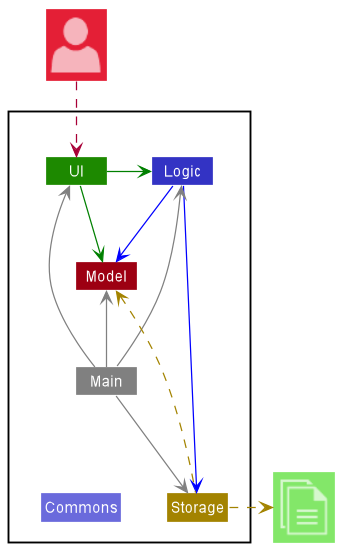
The Architecture Diagram given above explains the high-level design of the App.
Given below is a quick overview of main components and how they interact with each other.
Main components of the architecture
Main has two classes
called Main
and MainApp. It
is responsible for,
- At app launch: Initializes the components in the correct sequence, and connects them up with each other.
- At shut down: Shuts down the components and invokes cleanup methods where necessary.
Commons represents a collection of classes used by multiple other components.
The rest of the App consists of four components.
-
UI: The UI of the App. -
Logic: The command executor. -
Model: Holds the data of the App in memory. -
Storage: Reads data from, and writes data to, the hard disk.
How the architecture components interact with each other
The Sequence Diagram below shows how the components interact with each other for the scenario where the user issues
the command delete 1.
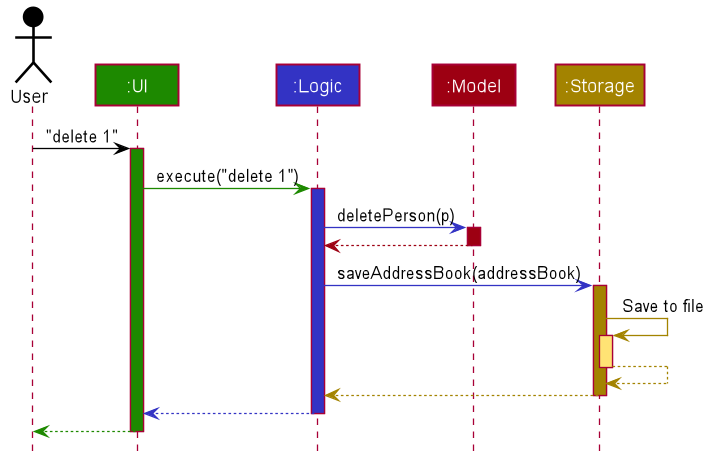
Each of the four main components (also shown in the diagram above),
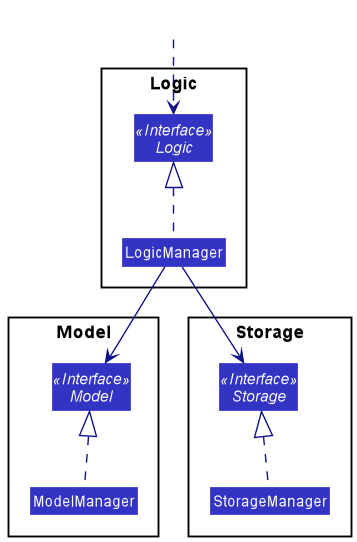
- defines its API in an
interfacewith the same name as the Component. - implements its functionality using a concrete
{Component Name}Managerclass (which follows the corresponding APIinterfacementioned in the previous point.
For example, the Logic component defines its API in the Logic.java interface and implements its functionality using
the LogicManager.java class which follows the Logic interface. Other components interact with a given component
through its interface rather than the concrete class (reason: to prevent outside component’s being coupled to the
implementation of a component), as illustrated in the (partial) class diagram below.
The sections below give more details of each component.
UI component
The API of this component is specified
in Ui.java
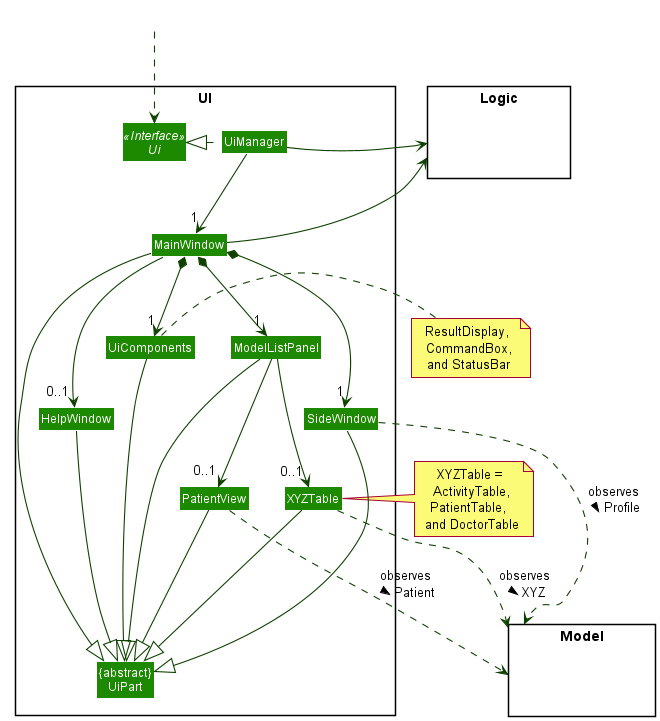
The UI consists of a MainWindow that is made up of many Ui components e.g.CommandBox, ResultDisplay, SideWindow
, StatusBarFooter etc. All these, including the MainWindow, inherit from the abstract UiPart class which captures
the commonalities between classes that represent parts of the visible GUI.
The UI component uses the JavaFx UI framework. The layout of these UI parts are defined in matching .fxml files that
are in the src/main/resources/view folder. For example, the layout of
the MainWindow
is specified
in MainWindow.fxml
The UI component,
- executes user commands using the
Logiccomponent. - keeps a reference to the
Logiccomponent, because theUIrelies on theLogicto execute commands. - listens for changes to
Modelactivities, doctors and patients data so that the respective Ui table can be shown and can be updated with the modified data. - depends on some classes in the
Modelcomponent, as it displaysDoctor,Profile,PatientandActivitiesobject residing in theModel.
The original Figma design for the UI component can be found here
To display the correct table (i.e. ActivityTable, PatientTable, or DoctorTable) or PatientView page to be shown in the MainWindow.
The MainWindow object also listens to the ModelBeingShown stored in the Model component.
The following Sequence Diagram illustrates how the UI component interacted with other components to show
the correct model to the user after the user enters list t/patient command.
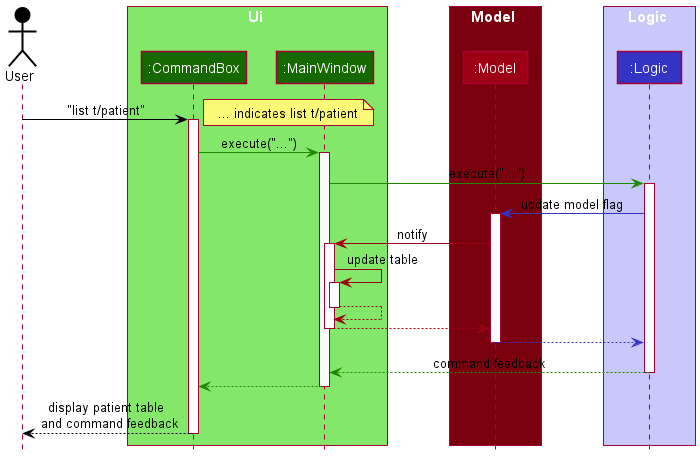
Note: GoMedic implements Observer Pattern using ObservableList and ObservableValue provided by the JavaFX framework to update the Ui
Logic component
API : Logic.java
Here’s a (partial) class diagram of the Logic component:
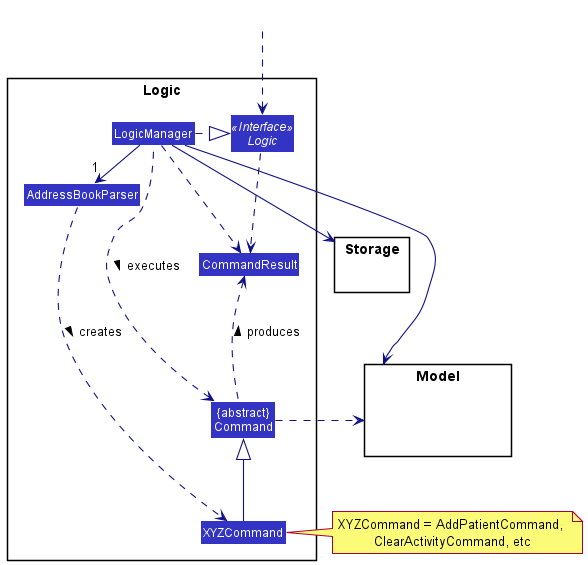
How the Logic component works:
- When
Logicis called upon to execute a command, it uses theAddressBookParserclass to parse the user command. - This results in a
Commandobject (more precisely, an object of one of its subclasses e.g.,AddPatientCommandwhich is executed by theLogicManager. - The command can communicate with the
Modelwhen it is executed (e.g. to add a patient). - The result of the command execution is encapsulated as a
CommandResultobject which is returned fromLogic.
The Sequence Diagram below illustrates the interactions within the Logic component for the
execute("delete t/patient P001") API call. Logic component will parse the command and create the respective Command
object. In this case, DeletePatientCommand object is created.
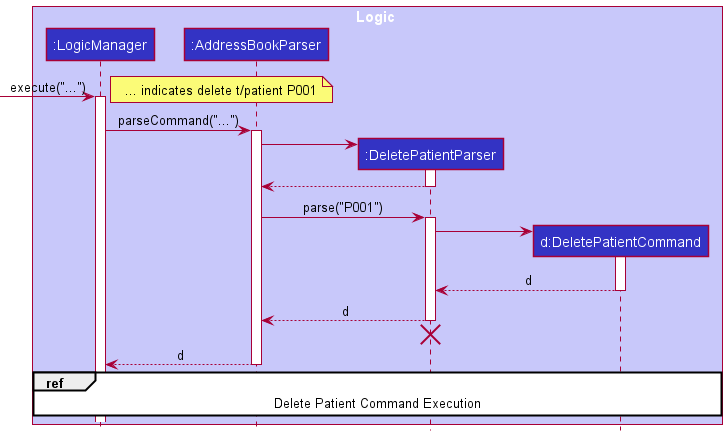
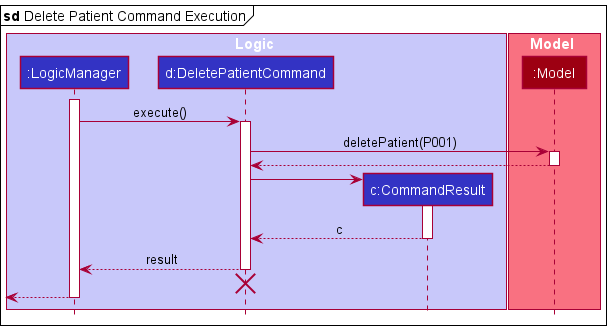
After the LogicManager receives the new DeletePatientCommand object,
- The
DeletePatientCommandwould call the appropriate method from theModelto delete the specifiedPatient.
Here are the other classes in Logic (omitted from the class diagram above) that are used for parsing a user command:
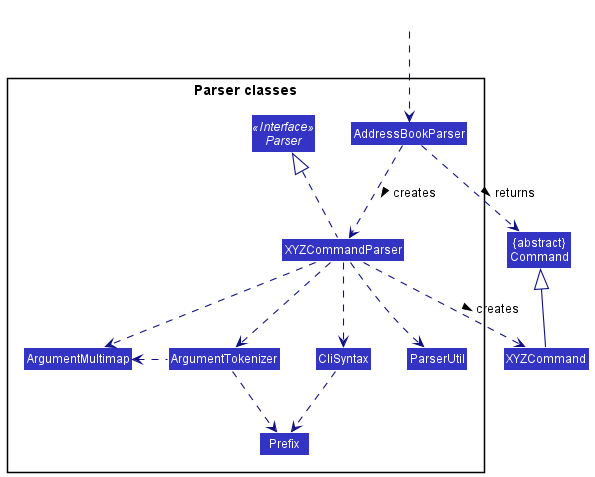
How the parsing works:
- When called upon to parse a user command, the
AddressBookParserclass creates anXYZCommandParser(XYZis a placeholder for the specific command name e.g.,AddPatientParser) which uses the other classes shown above to parse the user command and create aXYZCommandobject (e.g.,AddPatientCommand) which theAddressBookParserreturns back as aCommandobject. - All
XYZCommandParserclasses (e.g.,AddPatientParser,DeletePatientParser, …) inherit from theParserinterface so that they can be treated similarly where possible e.g, during testing.
Model component
API : Model.java
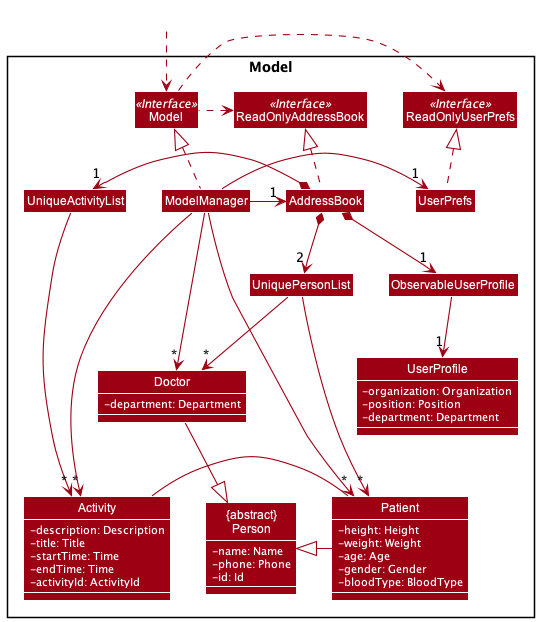
The Model component,
-
stores address book data, which consists of
Doctor,Patient,Activityobjects and oneUserProfileobject. -
DoctorandPatientObjects are each contained within their ownUniquePersonList<Doctor>orUniquePersonList<Patient>object respectively whileActivityobjects are contained within aUniqueActivityListobject. -
stores the currently ‘selected’
DoctororPatientobjects (e.g., results of a search query) as a separate filtered list which is exposed to outsiders as an unmodifiableObservableList<Doctor>orObservableList<Patient>. -
stores the currently ‘selected’
Activityobjects (e.g., results of a search query) as a separate filtered list which is exposed to outsiders as an unmodifiableObservableList<Activity>.Activityobjects can be filtered by its internal id or by its starting time. -
ObservableList<T>objects are objects that can be ‘observed’. e.g. the UI can be bound to this list so that the UI automatically updates when the data in the list change. -
stores a
UserPrefobject that represents the user’s preferences. This is exposed to the outside as aReadOnlyUserPrefobjects. -
does not depend on any of the other three components (as the
Modelrepresents data entities of the domain, they should make sense on their own without depending on other components)
Storage component
API : Storage.java
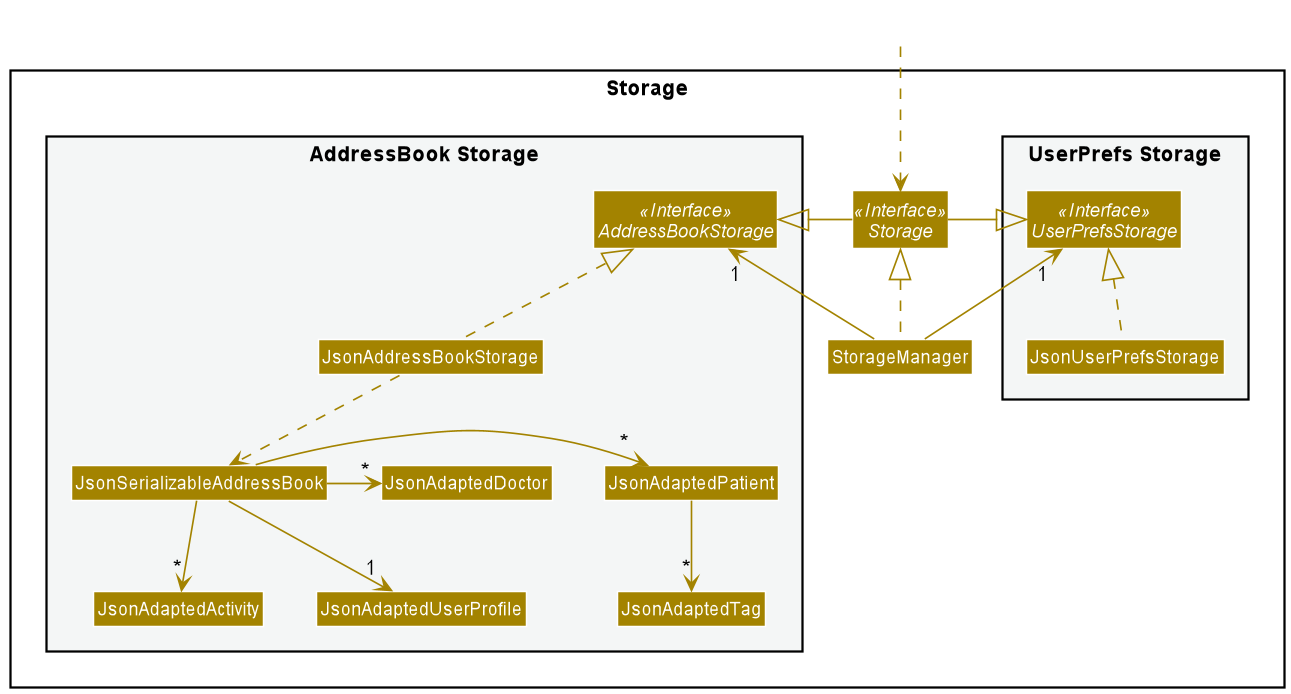
The Storage component handles the storing and loading of the data that GoMedic requires in order to function.
These include user-created data, such as the patients, activities, doctors, and the user profile that is stored in GoMedic,
as well as data related to the preferences and settings in GoMedic.
The Storage component makes use of the Jackson library to parse the data from GoMedic into a JSON format, and vice-versa.
- To load data from the user’s hard disk, it parses the data stored in human-readable
jsonfiles that reside in the[JAR file location]/data/directory. This directory is automatically created by GoMedic if it doesn’t already exist (usually occurs during the first launch). - To store data from GoMedic into these files, it parses important attributes of these data (e.g. for a doctor, important information
would include the doctor’s name, phone number and department) into a pre-defined
JSONformat. For doctors, this is defined inJsonAdaptedDoctor.java.
In general, the role of the Storage component is to:
- Save both user-created data (which is abstracted as the AddressBook) and user preference data in json format, and read them back into corresponding objects.
- Make use of its inheritance from both
AddressBookStorageandUserPrefStorageto play the role either one, depending on context, and the necessary functions required of it.
Note: To implement the Storage architecture, dependencies on some classes in the Model component,
such as Patient, Doctor, Activity and UserProfile are required.
This is because the Storage component’s job is to save/retrieve objects that belong to the Model, hence it would need
to access objects from these classes in order to acquire the necessary attributes from these objects to be stored. However,
note that we do not show these dependencies in the diagram above, in order to preserve the high-level design representation of
the Storage architecture, and to reduce unnecessary information overload.
Common classes
Classes used by multiple components are in the gomedic.commons package.
Implementation
This section describes some noteworthy details on how certain features are implemented.
Command History feature
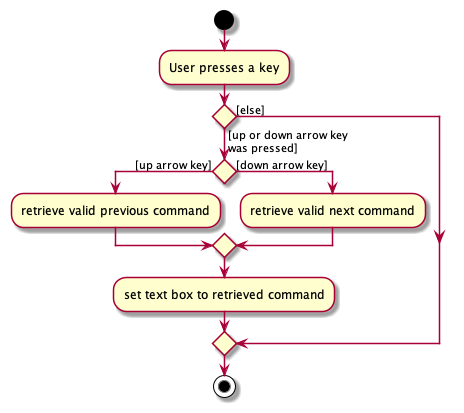
Command history feature helps the user keep track of all commands inputted in the current session and allows navigation back and forth between all the commands entered in the instance so far.
Given below is an activity diagram showing the event flow when the user executes a key press:
Suggestions feature
The suggestions feature is facilitated by Messages. It is a class consisting of static immutable string messages for
various fixed error outputs for GoMedic. It also implements the following operations:
-
Messages#getSuggestions(String command)— Returns suggested commands within GoMedic based on the incorrect command input.
Given below is a Sequence Diagram when a user provides an erroneous input, “adl t/patent”.
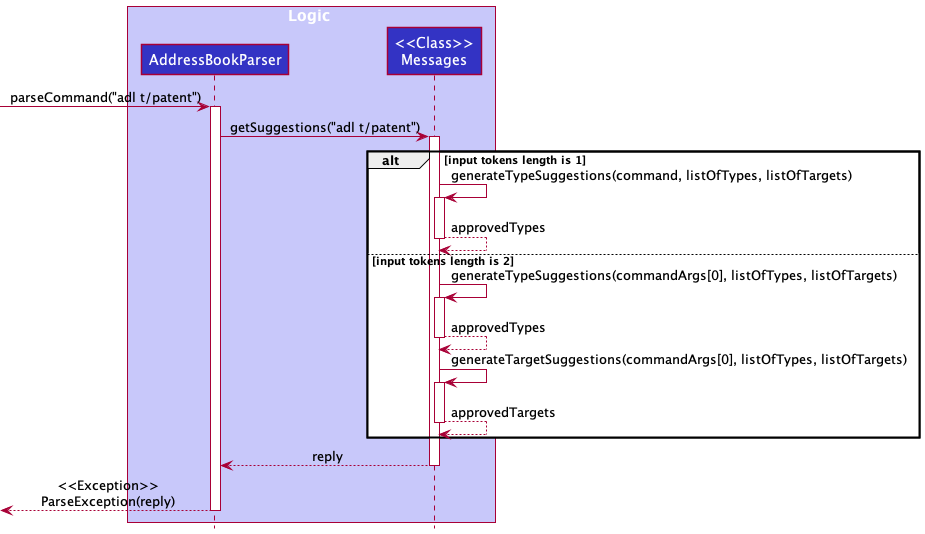
After GoMedic parses the invalid command,
- Each erroneous command is split into its type, which is the first word of the command, and the target, which is the rest of the command, if it exists.
- The method in the
Messagesclass does the appropriate function call(s) suitable for the nature of the erroneous command input given by the alternate paths in the diagram. - The outputs of the function calls are then compiled and then returned to the
AddressBookParserto be thrown as an exception withreplyas the error message to the user.
Note:
-
generateTypeSuggestionsandgenerateTargetSuggestionsare private methods only accessed from within getSuggestions and nowhere else. -
The suggestions are generated according to how close the erroneous commands are to the existing commands using the Levenshtein Distance metric and then ranked. The final output is an intersection of the suggestions generated from the two suggestion functions mentioned above.
Generating Medical Referral Feature
This feature allows GoMedic users to generate medical referral for a uniquely identified patient identified by his/her PatientId to other
doctor that is already saved in the GoMedic application and would be uniquely identified by his/her
DoctorId.
This feature can be accessed using referral command which has parameters of ti/Title, di/DoctorId, pi/PatiendId and optional
description which can be added using d/Description flag.
This feature uses iText Java Pdf writer library to generate the medical referral document.
Workflow
In general, the following Activity Diagram summarizes the workflow of this command :
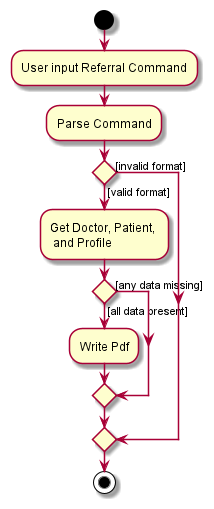
For illustration purposes, suppose the user enters the command:
referral ti/Referral of Patient A di/D001 pi/P001 d/He is having internal bleeding, need urgent attention.
Note: the doctor id and patient id does not need to conform the DXXX and PXXX format in this case. However, should the supplied ids are invalid,
GoMedic would be unable to find the doctor and the patient, and would show the feedback patient/doctor not found message to the user.
Once the user enter the command is entered, the following Sequence Diagram below shows how the components specified in the architecture interact with each other creates the new ReferralCommand object
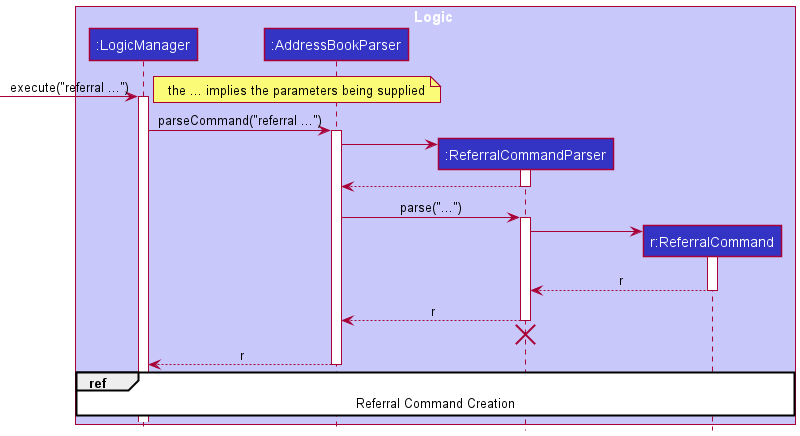
After the LogicManager receives the new ReferralCommand object,
- The
ReferralCommandthen would call the appropriate methods from theModelto obtain theUserProfile, DoctorListandPatientList` - Based on the illustration,
ReferralCommandthen would filter and check for the existence of patient whose id isP001and doctor whose id isD001.
Where the specific methods are shown in the sequence diagram shown below :
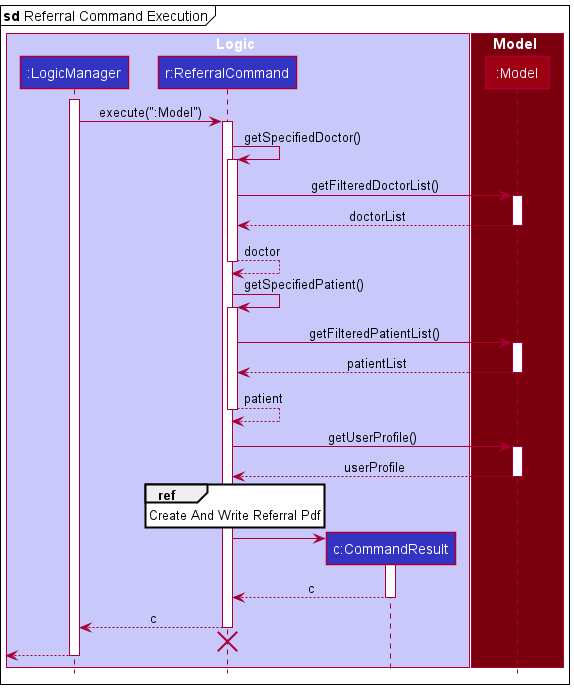
When the data is ready, the ReferralCommand object would call the iTextPdf library APIs that enable it to create a new Pdf document as shown
in the sequence diagram below :
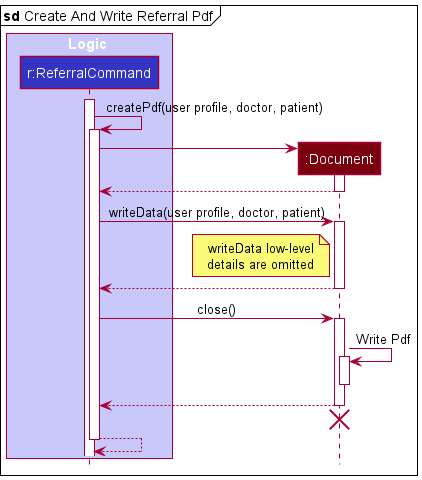
Finally, the pdf object is written into the data/ folder whose filename is the same of that of the title (i.e. title.pdf).
For this illustration, the file then would be Referral of Patient A.pdf.
Customizing user’s personal profile in GoMedic
This feature allows the user to customize his or her profile details on GoMedic. These details can then be used to
sign off the referrals generated by the referral command.
This feature can be accessed using the profile command. The user can customize these details through the parameters:
-
n/NAME: The name of the user -
p/POSITION: The position held by the user -
de/DEPARTMENT: The department that the user works in -
o/ORGANIZATION: The organization that the user works in
Given below is the sequence diagram when a user provides an example of a valid profile command
(profile n/Jon Snow p/Senior Consultant de/Department of Neurology o/National University Hospital)
to update his or her profile in GoMedic.
Note: The example below does not include the details of the creation of a ProfileCommand object, as the
implementation is similar to that of the example covered in the ReferralCommand above.
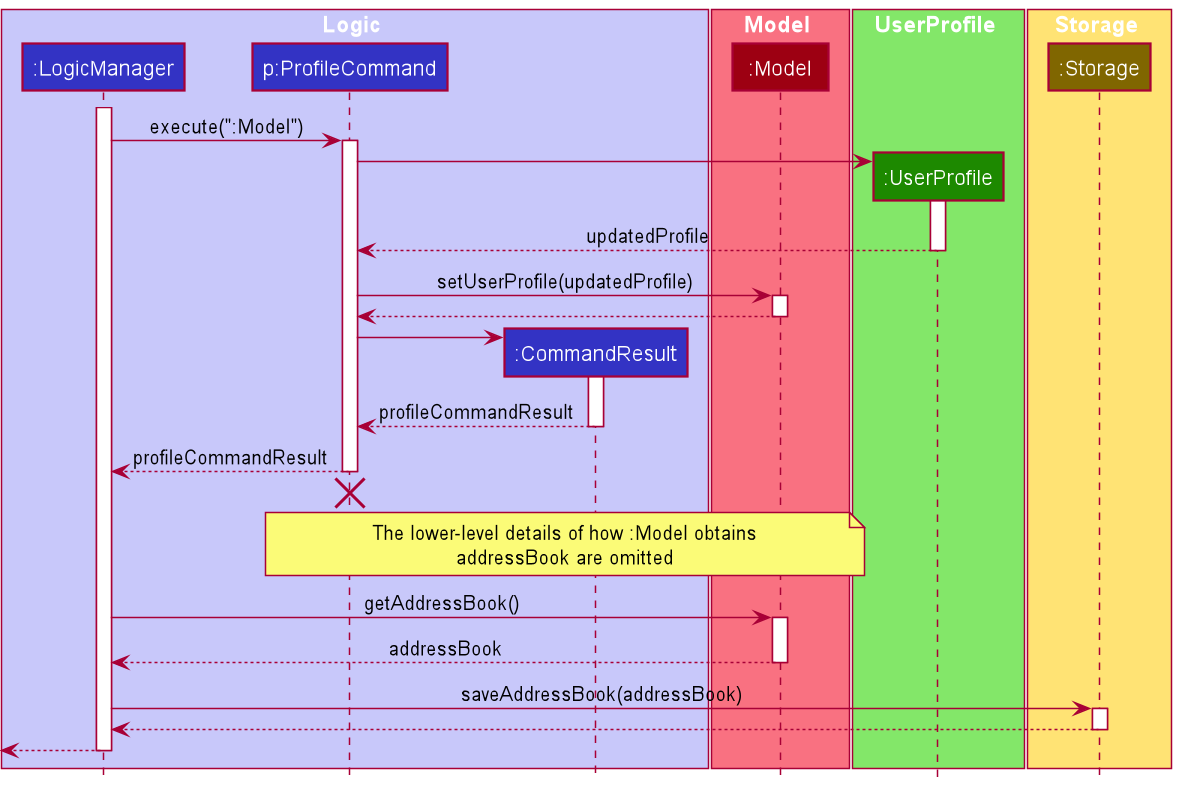
As seen in the diagram above, after the LogicManager receives the ProfileCommand object,
- The
LogicManagerwill call theexecutemethod ofProfileCommand, passing in theModelas a parameter to the method. - The
ProfileCommandwill then create a newUserProfileobject based on the details specified by the user in the command. - Then,
ProfileCommandwill callModel#setUserProfile(updatedProfile)to replace the existing user profile with the new one. - The
ProfileCommandwill create aCommandResultand return it toLogicManager. -
LogicManagerthen callsModel#getAddressBook()to get the newly updated address book in the model. - Finally,
LogicManagercallsStorage#saveAddressBook(addressBook)to update the new user profile in the storage and returns theCommandResultto be displayed to the user.
View feature
This feature allows user to view patient’s details as PatientTable does not show complete details of the patients.
This feature can be accessed using the view command, which currently only support the viewing of patient which follows
the following format view t/patient PATIENT_ID where PATIENT_ID is a valid id of a patient.
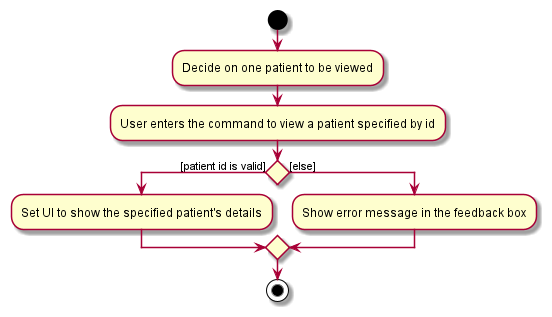
Given below is an activity diagram showing the event flow when the user wants to view a patient’s details:
Note: The example below does not include the details of the creation of a ViewPatientCommand object, as the
implementation is similar to that of the example covered in the ReferralCommand above.
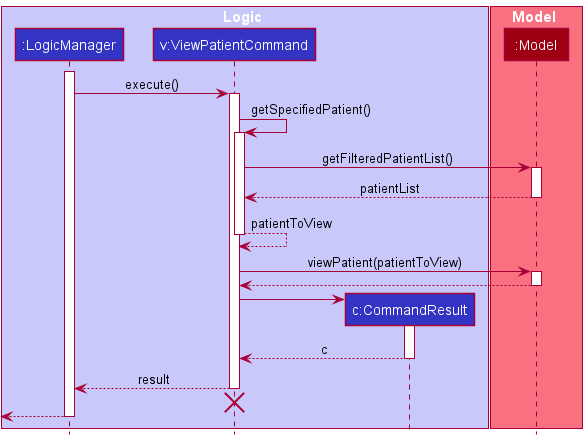
After the LogicManager receives the new ViewPatientCommand object,
- The
ViewPatientCommandwould call the appropriate method from theModelto obtain thePatient’s specific details to be viewed. - Only then a
CommandResultobject will be returned.
Find feature
This feature allows you to search for entries based on user input by matching the input string with the user-specified fields.
This feature can be accessed using the find command, which has a parameter
t/ that represents which kind of entry you are searching for (doctor which is represented by t/doctor,
patient which is represented by t/patient or activity which is represented by t/activity).
It also takes another flag which specifies the field within that entry to which the user input will be matched to,
followed by the keywords that the user wants to match the field to.
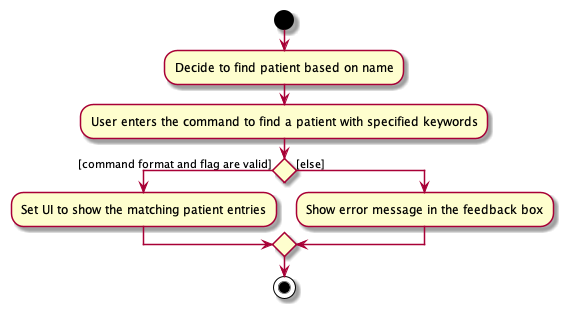
For example, find t/patient n/John Alice will display patients whose name contains John or Alice.
Given below is an activity diagram showing the event flow when the user wants to find a patient based on the name field with specified keywords:
Given below is a sequence diagram showing the event flow when the user wants to find patients based on the name field
(find t/patient n/John Alice)
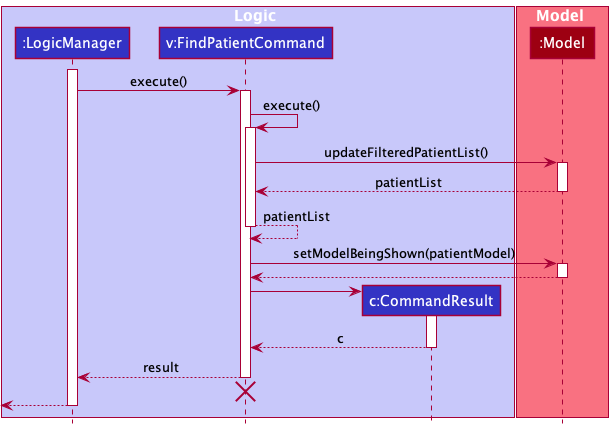
After the LogicManager receives the new FindPatientCommand object,
-
The
FindPatientCommandwould call the appropriate method from theModelto obtain the list ofPatients that match with the user’s input keywords. -
Only then will a
CommandResultobject be returned.
Documentation, logging, testing, configuration, dev-ops
Appendix: Requirements
Product scope
Target user profile:
- has a need to manage a significant number of patients and colleagues
- is a very busy man with lots of appointments and activities
- prefer desktop apps over other types
- can type fast and prefer CLI-formatted commands
- prefers typing to mouse interactions and is reasonably comfortable using CLI apps
- often forgets about his patient details and his schedule
Value proposition:
- manage patients contacts faster than a typical mouse/GUI driven app
- able to manage other doctors’ details
- able to store large amount of patients’ medical data
- able to retrieve the detailed information of a patient very quickly
- able to find certain particular patients, activities, or doctors
- able to display upcoming activities and appointments to the user
- easy to use and would give suggestion on the closest command whenever typo is made
User stories
Priorities:
-
High (must have) -
* * * -
Medium (nice to have) -
* * -
Low (unlikely to have) -
*
[EPIC] Basic CRUD Functionality for patients and doctors
| Priority | As a … | I want to … | So that I can… |
|---|---|---|---|
* * * |
user | add a new patient detail | retrieve and update them later |
* * * |
doctor | add a new colleague detail | remember their contact number and office numbers |
* * * |
user | delete an existing patient / doctor details | remove entries that I no longer need |
* * * |
user | update my patient details | change the details without deleting and adding the info again |
* * * |
doctor | update my colleague details | change the details without deleting and adding the info again |
* * * |
user | view all my patient details in a list | know my entire list of patients at a glance |
* * * |
user | view all my colleague details in a list | know my entire list of colleague at a glance |
[EPIC] Scheduling
| Priority | As a … | I want to … | So that I can… |
|---|---|---|---|
* * * |
busy user | add a new appointment with one of my patient | so that I can remember my appointments with them and be reminded of them in the future |
* * * |
busy user | add new activities such as meeting with colleagues | so that I can remember my schedules today with and be reminded of them in the future |
* * * |
user | delete existing appointments with my patients | remove appointments that are no longer happening |
* * * |
user | delete any existing activity | remove activities that are no longer happening and free my schedules up |
* * |
organized user | list all my future appointments with a certain patient | plan my schedules and track the appointments |
* * * |
organized user | list all my future activities | know my schedules and plan future activities accordingly |
* |
busy user | be reminded of my patients’ appointment 15 minutes before the schedule | prepare myself for the appointment |
* |
busy user | be reminded of my daily schedule when the app is started / at the start of the day | know what I will be doing for the day and plan ahead |
* * |
forgetful user | search for specific activities and appointments within a specific time frame | plan ahead and focus on those time slots only |
* |
organized user | change the reminder settings (minutes) | tailor it according to my preference |
[EPIC] Information Retrieval and Organization
| Priority | As a … | I want to … | So that I can… |
|---|---|---|---|
* |
experienced user | search for activities based on its title and description | retrieve certain grouped activities very fast such as meetings and visitations |
* * * |
busy user | search for patients whose details contain a user-specified substring | retrieve certain patients that I don’t really remember which fields where the details are stored at |
* * * |
busy user | search for doctors whose details contain a user-specified substring | retrieve my colleague details without any need to remember which fields the data are stored at |
[EPIC] Misc Helpful Features
| Priority | As a … | I want to … | So that I can… |
|---|---|---|---|
* * * |
new and forgetful user | pull up a list of commands | pick the right commands quickly |
* * * |
new user | sample entries in the app | know how the app would look like when I would populate it with my data |
* * * |
new user | have suggestions on typo that I made on commands | learn from my mistakes and correct it quickly |
* * |
fickle user | have the app accept multiple fixed ways to write dates and times | do not need to remember the correct format all the time |
Notable Use cases
For all use cases, the System is the GoMedic and the Actor is the user.
Use Case: [UC1] - Adding a new patient record
MSS
- User requests to add a new patient record.
-
GoMedic shows confirmation about the new patient record being added, and displays the patient’s full details.
Use case ends.
Extensions
-
1a. Incomplete patient details are given by users
-
1a1. GoMedic shows a feedback to the user about the missing data.
Use Case ends.
-
-
2a. Wrong patient details (not following the given constraints)
-
2a1. GoMedic shows a feedback to the user about the violation.
Use Case ends.
-
Use Case: [UC2] - Delete an existing patient record
MSS
- User requests to list all patients.
- GoMedic shows a list of patients.
- User requests to delete a specific patient in the list.
-
GoMedic deletes the patient.
Use case ends.
Extensions
-
2a. The list is empty.
Use case ends.
-
3a. The given index is invalid.
-
3a1. GoMedic shows a feedback to the user about invalid index.
Use case ends.
-
Use Case: [UC3] - Command Suggestions
MSS
- User types in a certain command such as creating new patient record (UC1) and deleting an existing patient record (UC2) with typo.
- GoMedic shows a list of suggested commands.
- User retypes the command and requests GoMedic to perform certain action.
-
GoMedic performs the specified action.
Use case ends.
Extensions
-
1a. Command is valid.
Use case ends.
-
2a. User decides not to retype the commands.
Use case ends.
-
3a. User input an invalid command.
Use case resumes at step 1.
Use Case: [UC4] - Adding a new appointment record
MSS
- User requests to add a new appointment record.
-
GoMedic shows confirmation about the new appointment record being added, and displays details of the appointment and which patient it is scheduled with.
Use case ends.
Extensions
-
1a. Incomplete appointment details are given by users
-
1a1. GoMedic shows a feedback to the user about the missing data.
Use Case ends.
-
-
1b. Patient which does not currently exist in the system is given.
-
1b1. GoMedic shows a feedback to the user about invalid patient
Use Case ends.
-
Use Case: [UC5] - Searching for specific records based on a specific field
MSS
-
User requests to search within either the Patient, Doctor, or Activity category, specifying a substring and a field to which that substring should be matched to.
-
GoMedic shows a response message with the number of matches that have been found, and displays the matching records.
Use case ends.
Extensions
-
1a. GoMedic gives feedback to user that no matches are found if there are no matching entries corresponding to the user’s input.
Return.
-
1b GoMedic displays an error when user input is in incorrect format. Return.
Use Case: [UC6] - View an existing patient record
MSS
- User requests to list all patients.
- GoMedic shows a list of patients.
- User requests to view a specific patient in the list.
-
GoMedic shows the patient’s details
Use case ends.
Extensions
-
2a. The list is empty.
Use case ends.
-
3a. The given index is invalid.
-
3a1. GoMedic shows a feedback to the user about invalid index.
Use case ends.
-
Use Case: [UC7] - Clear all doctor records in GoMedic
MSS
- User requests to list all doctors.
- GoMedic shows a list of doctors.
-
User requests to clear all records of the doctors.
Use case ends.
Extensions
-
2a. The list is empty.
Use case ends.
Use Case: [UC8] - Navigate to the past command
MSS
- User wants to get the previous command he typed.
-
GoMedic shows the previous command the user typed.
Use case ends.
Extensions
-
2a. There is no previous command.
Use case ends.
Use Case: [UC9] - Changing the user’s profile
MSS
- User requests to change his/her profile on GoMedic
-
GoMedic shows confirmation that the user’s profile has been updated, and displays the new profile
Use case ends.
Extensions
-
1a. The details supplied by the user is incomplete.
-
1a1. GoMedic shows a feedback to the user about the necessary details that need to be supplied.
Use Case ends.
-
-
1b. An incorrect detail, that does not conform to the constraints imposed by GoMedic, is supplied by the user.
-
1b1. GoMedic shows a feedback to the user about the detail of the constraint that is violated.
Use case ends.
-
Non-Functional Requirements
- Should work on any mainstream OS as long as it has Java
11or above installed. - Should be able to be run without any installation required as long as the user has Java
11installed. - Should be able to hold up to 2000 patients and colleagues without a noticeable delay (less than 2 seconds) in performance for typical usage.
- Should be able to hold up to 1000 future activities and future appointments, and be retrieved without a noticeable delay (less than 2 seconds) for typical searches.
- Should be only used by a single user and do not require other users to make changes to the app such as making appointment or sharing activities.
- The data should not be stored using a DBMS.
- The data should be stored locally and should be in a human editable and easily modified text file.
- The project is expected to adhere to a biweekly version release using breadth-first incremental technique.
- Should be less than 100 MB in size for the software, and less than 15 MB per file for each document.
- The developer guide and user guide must be pdf-friendly (meaning no embedded video, animations, embedded PowerPoint, etc.).
- Should be delivered to the user using a single JAR file.
- Graphical User Interface (GUI) should work reasonable well for standard screen resolution of 1920 x 1080 and higher with screen scales 100% and 125%, and also usable for screen resolutions 1280 x 720 and higher with screen scales 150%.
- Should be written mainly using Object-oriented paradigm.
- The app is not required to be able to interact with external pieces of hardware such as printer.
- The data stored within the app should be encrypted for security purposes (to prevent the raw data being read by external parties).
- The app is mainly used for users based in Singapore, and therefore some local terms are tolerable, and the app is not expected to operate in other languages except English.
Glossary
- Mainstream OS: Windows, Linux, Unix, OS-X.
- DBMS : Database Management System such as MySQL, Oracle, PSQL, MongoDB, etc.
- JAR : Java Archive file format, which is typically used to aggregate many Java class files and associated metadata into one file for distribution.
- Typical usage/searches : Finding by keyword, name, medical histories, and any combination of the field manually.
Appendix: Instructions for manual testing
Given below are instructions to test the app manually.
Note: These instructions only provide a starting point for testers to work on;
testers are expected to do more exploratory testing.
Launch and shutdown
-
Initial launch
-
Download the jar file and copy into an empty folder
-
Double-click the jar file. If you are unable to do so, you might need to run
java -jar gomedic.jarfrom the terminal where thegomedic.jarfile is located. Expected: Shows the GUI with a set of sample contacts. The window size may not be optimum.
-
-
Saving window preferences
-
Resize the window to an optimum size. Move the window to a different location. Close the window.
-
Re-launch the app by double-clicking the jar file.
Expected: The most recent window size and location is retained.
-
Adding a record in GoMedic
-
Add a new activity by supplying all necessary parameters. Do the test cases sequentially to ensure correct id number is created.
-
Prerequisite: Ensure you activities data are empty by using
clear t/activitycommand and check it again usinglist t/activitycommand. The table should show “no activities to be displayed”. -
Test case:
add t/activity s/15/09/2022 14:00 e/15/09/2022 15:00 ti/Activity 1 d/Discussing the future of CS2103T-T15 Group!
Expected: New activity whose idA001is created, confirmation is shown in feedback box, and the activity table is shown. -
Test case:
add t/activity s/15/09/2022 14:00 e/15/09/2022 15:00 ti/Activity 2
Expected: Conflicting activity error is shown. -
Test case:
add t/activity s/15/09/2023 14:00 e/15/09/2023 15:00 ti/Activity 3
Expected: New activity whose idA002is created with empty description. -
Test case:
add t/activity s/15-09-2024 14:00 e/15-09-2024 15:00 ti/Activity 4
Expected: New activity whose idA003is created with empty description despite different datetime format supplied. -
Test case:
add t/activity s/15-09-2025 15:00 e/15-09-2025 14:00 ti/Activity 5
Expected: Error message start time must be strictly less than end time is shown in the feedback box. -
Other incorrect
add t/activitycommands to try:add t/activitieswith invalid parameters, etc
Expected: Error message shown in the feedback box.
-
-
Add a new patient by supplying all necessary parameters. Do the test cases sequentially to ensure correct id number is created.
-
Prerequisite: Ensure you patients data are empty by using
clear t/patientcommand and check it again usinglist t/patientcommand. The table should show “no patients to be displayed”. -
Test case:
add t/patient n/John Smith p/98765432 a/45 b/AB+ g/M h/175 w/70 m/heart failure m/diabetes
Expected: New patient whose idP001is created, confirmation is shown in feedback box, and the patient table is shown. -
Test case:
add t/patient n/John Snow p/12312312 a/51 b/B+ g/M h/173 w/65 m/heart failure
Expected: New patient whose idP002is created. -
Test case:
add t/patient n/Tim Burton p/33334444 a/50 b/O g/M h/173 w/65
Expected: Error message “blood type should only contain A+, A-, B+, B-, AB+, AB-, O+, or O-, and it should not be blank. All non capital letters will be capitalized” will be shown in the feedback box. -
Test case:
add t/patient n/Cedric Tom p/11112222 a/23 b/O+ g/M h/800 w/65
Expected: Error message height should be integer between 1 and 300 inclusive is shown in the feedback box. -
Other incorrect
add t/patientcommands to try:add t/patients,add t/patientwith invalid parameters, etc.
Expected: Error message shown in the feedback box.
-
-
Add a new doctor by supplying all necessary parameters. Do the test cases sequentially to ensure correct id number is created.
-
Prerequisites: Ensure the doctors’ data are empty by using
clear t/doctorcommand and check it again usinglist t/doctorcommand. The table should show “no doctors to be displayed”. -
Test case:
add t/doctor n/John Smith p/98765432 de/Cardiology
Expected: New doctor whose idD001is created, confirmation is shown in feedback box, and the doctor table is shown. -
Test case:
add t/doctor n/Tim Burton p/93561345
Expected: Error message of invalid command format is shown in the feedback box, as a department was not specified. -
Test case:
add t/doctor n/Cedric Tom p/11112222333 de/Cardiology
Expected: Error message that phone number should be 8 digits long is shown in the feedback box. -
Other incorrect
add t/doctorcommands to try:add t/doctors, invalid parameters,...
Expected: Error message shown in the feedback box.
-
Deleting a record in GoMedic
-
Deleting an activity while all activities are being shown
-
Prerequisite: List all activities using the
list t/activitycommand. Ensure at least 1 activity with idA001is there, otherwise please useadd t/activitycommand to add a new activity. Multiple activities will be displayed in a table sorted by its id. -
Test case:
delete t/activity A001
Expected: Activity whose idA001. Details of the deleted contact shown in the feedback box. -
Test case:
delete t/activity A001
Expected: No activity is deleted. Error details shown in the feedback box. -
Other incorrect
delete t/activitycommands to try:delete t/activity,delete t/activities,delete t/activity x(where x is an invalid id), etc
Expected: Error message shown in the feedback box.
-
-
Deleting a patient while all patients are being shown
-
Prerequisite: List all patients using the
list t/patientcommand. Ensure at least 1 patient with idP001is there, otherwise please useadd t/patientcommand to add a new patient. Multiple patients will be displayed in a table sorted by its id. -
Test case:
delete t/patient P001
Expected: Patient with idP001is deleted. Details of the deleted patient shown in the feedback box. -
Test case:
delete t/patient P001
Expected: No patient is deleted. Error details shown in the feedback box. -
Prerequisite: Clear the entire GoMedic using
clearcommand. Add 1 new patient by runningadd t/patient n/John Smith p/98765432 a/45 b/AB+ g/M h/175 w/70 m/heart failure m/diabetesand 1 new appointment by runningadd t/appointment i/P001 s/15/09/2022 14:00 e/15/09/2022 15:00 ti/Appointment with P001 d/Follow-up from tuesday's appointment. -
Test case:
delete t/patient P001
Expected: Patient with idP001is deleted. Details of the deleted patient shown in the feedback box. Appointment related to the patient will be deleted as well. -
Other incorrect delete patient commands to try:
delete t/patient,delete t/patients,delete t/patient x(where x is an invalid id), etc
Expected: Error message shown in the feedback box.
-
-
Deleting a doctor while all doctors are being shown
-
Prerequisites: List all doctors using the
list t/doctorcommand. Ensure at least 1 doctor with idD001is there, otherwise please useadd t/doctorcommand to add a new doctor. Multiple doctors will be displayed in a table sorted by its id. -
Test case:
delete t/doctor D001
Expected: Doctor with idD001is deleted. Details of the deleted doctor are shown in the feedback box. -
Test case:
delete t/doctor D001
Expected: No doctor is deleted. Error details shown in the feedback box. -
Other incorrect delete doctor commands to try:
delete t/doctor,delete t/doctors,delete t/doctor x(where x is an invalid id),...
Expected: Error message shown in the feedback box.
-
Editing a record in GoMedic
-
Editing an existing activity
-
Prerequisite: Clear the entire activity using
clear t/activitycommand. Add a new activity usingadd t/activitycommand to ensure at least 1 activity with idA001is there. Check that it exists usinglist t/activity. Please do the test sequentially. -
Test case:
edit t/activity i/A001 ti/Another new title
Expected: Activity whose idA001has its title changed to “Another new title” -
Test case:
edit t/activity i/A001 s/17/10/2021 14:00 e/17/10/2021 15:00
Expected: Activity whose idA001has its start time changed to “17-10-2021 14:00” and end time to “17-10-2021 15:00” -
Test case:
edit t/activity i/A001 s/17/10/2021 18:00 e/17/10/2021 15:00
Expected: Error message shows start time must be before end time. -
Test case: Add another activity using
add t/activity s/15/09/2022 14:00 e/15/09/2022 15:00 ti/Meeting with Mr. Yand then runedit t/activity i/A001 s/15/09/2022 14:00 e/15/09/2022 15:00
Expected: Error message shows the activity’s timing is conflicting with another activity. -
Other incorrect
edit t/activitycommands to try:edit t/activity i/a001 pi/p001(cannot change patient id),edit t/activities,edit t/activity(no parameters), etc.
Expected: Error message shown in the feedback box.
-
-
Editing an existing doctor
-
Prerequisite: Clear all existing doctors in GoMedic using
clear t/doctorcommand. Add a new doctor usingadd t/doctorcommand. Ensure that a doctor with idD001exists by executinglist t/doctor. Conduct the following tests in sequential order. -
Test case:
edit t/doctor i/D001 n/Jon Snow
Expected: Doctor whose id isD001has his/her name changed to “Jon Snow”. -
Test case:
edit t/doctor i/D001 n/Jon Low p/98765432
Expected: Doctor whose id isD001has his/her name changed to “Jon Low”, and phone number changed to “98765432”. -
Test case:
edit t/doctor i/D001 n/Jon Low p/9191
Expected: Feedback box displays constraint violation error message, indicating that the phone number has to be entirely numeric and exactly 8 digits. -
Other incorrect
edit t/doctorcommands to try:edit t/doctor(no parameters supplied),edit t/doctor n/(no value supplied forNAMEparameter), etc
Expected: Feedback box displays error message indicating an invalid command / invalid command format / parameter constraints violations.
-
-
Editing an existing patient
-
Prerequisite: Clear the entire patient using
clear t/patientcommand. Add a new patient usingadd t/patientcommand to ensure at least 1 patient with idP001is there. Check that it exists usinglist t/patient. Please do the test sequentially. -
Test case:
edit t/patient i/P001 n/Tom tom
Expected: Patient whose idP001has his/her name changed to “Tom tom” -
Test case:
edit t/patient i/P001 h/165 w/76
Expected: Patient whose idP001has his/her height changed to “165” and weight changed to “76” -
Test case:
edit t/patient i/P001 p/12345678 b/O-
Expected: Patient whose idP001has his/her phone number changed to “12345678” and blood type to “O-“ -
Test case:
edit t/patient i/P001 a/77 g/O
Expected: Patient whose idP001has his/her age changed to “77” and gender changed to “O” -
Test case:
edit t/patient i/P001 b/C+
Expected: Error message “blood type should only contain A+, A-, B+, B-, AB+, AB-, O+, or O-, and it should not be blank. All non capital letters will be capitalized” will be shown in the feedback box. -
Other incorrect
edit t/patientcommands to try:edit t/patients,edit t/patient(no parameters), etc
Expected: Error message shown in the feedback box.
-
Changing the user profile
-
Changing the user profile shown on the left side window
-
Test case:
profile n/Jon Snow p/Consultant de/Department of Cardiology o/National University HospitalExpected: The feedback box displays the confirmation of the change of user profile, and GoMedic updates the left side window with the corresponding information. -
Test case:
profile n/Bernice Yu p/Associate Professor de/Department of RadiologyExpected: The feedback box displays an error message stating that an invalid command format has been detected. This corresponds to the fact that the user has not supplied his/herORGANIZATIONin the command. -
Test case:
profile n/Bernice Yu p/Associate. Professor de/Department of Radiology o/Tan Tock Seng HospitalExpected: The feedback box displays an error message stating that thePOSITIONparameter should only contain alphanumeric characters and spaces. This corresponds to the fact that the user included an illegal character.in thePOSITIONparameter of the command. -
Other incorrect
profilecommands to try: Commands that resemble the command in test case 1, but include the illegal character.in itsNAME,DEPARTMENTorORGANIZATIONparameters. Expected: The feedback box displays an error message stating that the constraints for those parameters have been violated, similar to that in test case 3.
-
Creating A Referral
-
Creating a referral using the template available.
-
Prerequisite: Check that you have
[JAR Location]/datafolder, it should be created after you run GoMedic for the first time. Clear the entire patient and activity usingclear t/patientandclear t/doctorrespectively. Run the following commands to add 1 patient and doctor usingadd t/patient n/John Doe p/98765432 a/45 b/AB+ g/M h/175 w/70 m/heart failure m/diabetesandadd t/doctor n/John Smith p/98765432 de/Cardiologyrespectively.
Check that patient whose idP001and doctor whose idD001exists usinglist t/patientandlist t/doctorrespectively. Also use this default profile by inputting this commandprofile n/John Smith p/Senior Resident de/Cardiology o/NUH. -
Test case:
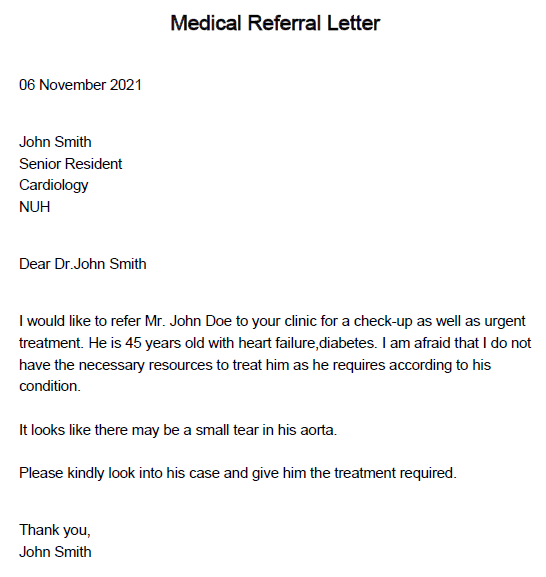
referral ti/Referral di/D001 pi/P001 d/It looks like there may be a small tear in his aorta.
Expected: A new referral calledReferral.pdfis created in thedatafolder. The file should look like the following image but the date should be the date where you run the referral command.
-
Other incorrect
referralcommands to try:referral ti/test di/d002 pi/p003(non-existent doctor and patient id), etc
Expected: Error message shown in the feedback box.
-
Viewing a patient
-
Viewing an existing patient
-
Prerequisite: Clear the entire patient using
clear t/patientcommand. Add a new patient usingadd t/patientcommand to ensure only 1 patient exist with idP001is there. Check that it exists usinglist t/patient. Please do the test sequentially. -
Test case:
view t/patient P001
Expected: Patient whose idP001has its details shown in GoMedic application -
Test case:
view t/patient P002
Expected: Error message the patient id doesn’t exist in the list will be shown in the feedback box -
Other incorrect view patient commands to try:
view t/patients,view t/patient(no parameters), etc.
Expected: Error message shown in the feedback box.
-
Listing records in GoMedic
-
Listing activities in GoMedic
-
Prerequisite: Clear all existing activities in GoMedic using
clear t/activitycommand. Add 2 new activities by runningadd t/activity s/15/09/2022 14:00 e/15/09/2022 15:00 ti/team meeting d/CS2103t group discussionandadd t/activity s/14/09/2022 11:00 e/14/09/2022 12:00 ti/Lunch with CEO d/Lunch to discuss promotionin order. Conduct the following tests in sequential order. -
Test case:
list t/activity
Expected: GoMedic shows a table with 2 activities, one with idA001and another with idA002. -
Test case:
list t/activity s/START
Expected: GoMedic shows both activities, but the activity with idA002is shown before the activity with idA001. -
Test case:
list t/activity s/START p/ALL
Expected: GoMedic shows both activities, but the activity with idA002is shown before the activity with idA001. -
Test case:
list t/activity p/HEHE
Expected: The feedback box displays an error message about the parameter supplied. -
Other valid
list t/activitycommands to try: First, add an activity whose date for theSTART_TIMEandEND_TIMEcorresponds to date that the user tests thelist t/activitycommand. Then, runlist t/activity s/ID p/TODAY.
Expected: GoMedic shows a table of activities that includes the activity mentioned above. -
Other invalid
list t/activitycommands to try:list t/activites,list t/activity s/HOHO(invalid parameter supplied), etc
Expected: Feedback box displays error message indicating an invalid command / parameter constraints violations.
-
-
Listing doctors in GoMedic
-
Prerequisite: Clear all existing doctors in GoMedic using
clear t/doctorcommand. Add 2 new doctors by runningadd t/doctor n/John Smith p/98765432 de/Cardiologyandadd t/doctor n/Tom Hill p/12345678 de/Radiologyin order. Conduct the following tests in sequential order. -
Test case:
list t/doctor
Expected: GoMedic shows a table with 2 doctors, one with idD001and another with idD002. -
Test case:
list t/doctor extra parameters supplied here
Expected: GoMedic shows a table with 2 doctors, one with idD001and another with idD002, as it ignores the extra parameters supplied. -
Other invalid
list t/doctorcommands to try:list t/doctors
Expected: Feedback box displays error message indicating an invalid command.
-
-
Listing patients in GoMedic
-
Prerequisite: Clear all existing patients in GoMedic using
clear t/patientcommand. Add 2 new patients by runningadd t/patient n/John Smith p/98765432 a/45 b/AB+ g/M h/175 w/70 m/heart failure m/diabetesandadd t/patient n/Joan Lim p/12345678 a/30 b/A- g/F h/165 w/45 m/high blood pressurein order. Conduct the following tests in sequential order. -
Test case:
list t/patient
Expected: GoMedic shows a table with 2 patients, one with idP001and another with idP002. -
Test case:
list t/patient extra parameters supplied here
Expected: GoMedic shows a table with 2 patients, one with idP001and another with idP002, as it ignores the extra parameters supplied. -
Other invalid
list t/patientcommands to try:list t/patients
Expected: Feedback box displays error message indicating an invalid command.
-
Clearing records in GoMedic
-
Clearing activity records in GoMedic
-
Prerequisite (run before every test case): Clear the entire activity using
clear t/activitycommand. Add 2 new activities by runningadd t/activity s/15/09/2022 14:00 e/15/09/2022 15:00 ti/Meeting with Mr. Y d/Discussing the future of CS2103T-T15 Group!andadd t/activity s/16/09/2022 14:00 e/16/09/2022 15:00 ti/Meeting with Mr. X d/Discussing the features of CS2103T-T15 Project!in order. Conduct the following tests in sequential order. -
Test case:
clear t/activity
Expected: GoMedic shows an empty activity table -
Test case:
clear t/activity extra parameters supplied here
Expected: GoMedic shows an empty activity table, as it ignores the extra parameters supplied. -
Other invalid
clear t/activitycommands to try:clear t/activities
Expected: Feedback box displays error message indicating an invalid command.
-
-
Clearing doctor records in GoMedic
-
Prerequisite (run before every test case): Clear the entire doctor using
clear t/doctorcommand. Add 2 new doctors by runningadd t/doctor n/John Smith p/98765432 de/Cardiologyandadd t/doctor n/Tommy Tom p/12312312 de/Skinin order. Conduct the following tests in sequential order. -
Test case:
clear t/doctor
Expected: GoMedic shows an empty doctor table -
Test case:
clear t/doctor extra parameters supplied here
Expected: GoMedic shows an empty doctor table, as it ignores the extra parameters supplied. -
Other invalid
clear t/doctorcommands to try:clear t/doctors
Expected: Feedback box displays error message indicating an invalid command.
-
-
Clearing patient records in GoMedic
-
Prerequisite (run before every test case): Clear the entire patient using
clear t/patientcommand. Add 2 new patients by runningadd t/patient n/John Smith p/98765432 a/45 b/AB+ g/M h/175 w/70 m/heart failure m/diabetesandadd t/patient n/Joan Lim p/12345678 a/30 b/A- g/F h/165 w/45 m/high blood pressurein order.(run before test case 4): Add 1 new appointment by running
add t/appointment i/P001 s/15/09/2022 14:00 e/15/09/2022 15:00 ti/Appointment with P001 d/Follow-up from tuesday's appointment.Conduct the following tests in sequential order. -
Test case:
clear t/patient
Expected: GoMedic shows an empty patient table -
Test case:
clear t/patient extra parameters supplied here
Expected: GoMedic shows an empty patient table, as it ignores the extra parameters supplied. -
Test case:
clear t/patient
Expected: GoMedic shows an empty patient table and delete all appointments as all the patients are deleted -
Other invalid
clear t/patientcommands to try:clear t/patients
Expected: Feedback box displays error message indicating an invalid command.
-
-
Clearing all records in GoMedic
-
Prerequisites (run before every test case): Clear the entire GoMedic using
clearcommand. Add 1 new activity by runningadd t/activity s/15/09/2022 14:00 e/15/09/2022 15:00 ti/Meeting with Mr. Y d/Discussing the future of CS2103T-T15 Group!, 1 new doctor by runningadd t/doctor n/John Smith p/98765432 de/Cardiology, and 1 new patient by runningadd t/patient n/John Smith p/98765432 a/45 b/AB+ g/M h/175 w/70 m/heart failure m/diabetesConduct the following tests in sequential order. -
Test case:
clear
Expected: GoMedic clears all records for activities, doctors, and patients -
Test case:
clear extra parameters supplied here
Expected: GoMedic clears all records for activities, doctors, and patients, as it ignores the extra parameters supplied.
-
Finding a patient, doctor or activity
- Searching for a doctor or a patient
-
Prerequisite: List the patients, doctors, or activities based on which one you wish to see, using the
listcommand. e.g.list t/doctororlist t/patientorlist t/activity. -
Test case: e.g.
find t/patient n/JoeExpected: All patients whose names contain the substring “Joe” (case-insensitive) will be displayed. -
Test case: e.g.
find t/activity ti/MeetingExpected: All activities whose title or description contains the substring “Meeting” (case-insensitive) will be displayed. -
Other incorrect find commands to try:
find t\patient JoeExpected: Error message as a flag is not specified prior to the keyword.
-
Displaying suggestions for commands that are misspelled
-
Displaying suggestions for commands that are misspelt and in invalid format
-
Test case: e.g.
find pateintExpected:find t/patient,find t/doctor,find t/activityshould all be listed in the feedback box. -
Test case: e.g.
clapExpected:clear t/patient,clear t/doctor,clear t/activity,clearshould all be listed in the feedback box. -
For really badly spelt commands, such as this test case: e.g.
asdahsdhajshdExpected: Feedback box should only say,Sorry, asdahsdhajshd is an invalid command.
-
-
Displaying suggestions for commands that are misspelt but in valid format
-
Test case: e.g.
find t/pateintExpected: onlyfind t/patientshould be listed in the feedback box. -
Test case: e.g.
add t/appentExpected:add t/patient,add t/appointmentshould both be listed in the feedback box. -
Test case: e.g.
add t/apsdaExpected: Feedback box should only say,Sorry, add t/apsda is an invalid command.
-
Navigating between all commands input in the current session
-
Going back to previously typed commands
-
Prerequisite (follow the steps accordingly before going ahead with the tests in this section):
- Open up GoMedic
- Clear GoMedic with the
clearcommand - Input
add t/doctor n/John Smith p/98765432 de/Cardiologyand enter - Input
add t/doctor n/John Wayne p/11111111 de/OBand enter - Proceed to conduct the following tests in sequential order
-
Test case:
Uparrow key is pressed once Expected:add t/doctor n/John Wayne p/11111111 de/OBshould show up in the input box. -
Test case:
Uparrow key is pressed twice Expected:clearshould show up in the input box. - Test case:
Uparrow key is pressed once Expected:clearshould still be in the input box.
-
Prerequisite (follow the steps accordingly before going ahead with the tests in this section):
-
Going forward to more recent commands
-
Note:
- The current state before any tests are done in this section should be carried over from the previous section.
- The following tests should be done in order
-
Test case:
Downarrow key is pressed once Expected:add t/doctor n/John Smith p/98765432 de/Cardiologyshould show up in the input box. - Test case:
Downarrow key is pressed twice Expected: The input box should be cleared.
-
Note:
Appendix: Effort
Overview
Overall, this project is a moderately challenging application. Most of the features here are CRUD features, but a lot of efforts need to be put to replicate CRUD for an extra model in the application as we add some specific characteristics to each model. While the original AB3 only deals with
one entity type which is Person, we modify the Person to be a generic class and add three models called Activity, Patient and Doctor.
Our app is more complex in a sense we need to deal
with three entities at once and manage the interactions between them such as creating appointments, viewing patients, creating referral, etc. Also, we need to maintain the information of which
model is being displayed and switching the “page” of these three models depending on the commands called. Hence, a lot of ObservableValue<T> from JavaFX library is used to so that the Ui can monitor
the model of interest currently.
Not only that, there is an extra model called UserProfile to personalize the application as it will display the user identity in te sidebar, and the UserProfile is also used for creating a referral.
Some noteworthy efforts:
- To implement the responsive table view, we need to mainly refer to this
TableViewarticle. We need to learn abouttableCellFactoryalso to change the height dynamically based on the length of the data inside the cell. - The implementation of
CRUDmethods ofActivity,DoctorandPatientmainly refers from AB3Personand their commands. However, we create all our fields ourselves and test them. ForTimefield, it is mainly a wrapper overLocalDateTimeclass provided by Java. - We overhaul the entire
Uibased on the Figma, therefore we also create a new side window, and modifies theCSSmoderately. We also discard thepersonViewandpersonCardas they are no longer used. - We allow users to add
Appointment, an extension ofActivitywhich stores related patient in the appointment. - We create a new
Uifor viewing patient details which will show all the patient’s appointments and medical conditions. - Quality of life improvements such as a more extensive help page, ability to see suggestions for misspelt commands and ability to navigate between all inputted commands in the current session.